


Community Service
Coordinator
Mrs. O'Grady and Mr. Kohut
All students are required to complete 20 hours of community service. Students are encouraged to complete five hours of work each year. Community Service will appear on the transcript and indicate whether a student has met the required hours, is in the process of completing the hours, or has not initiated the hours.
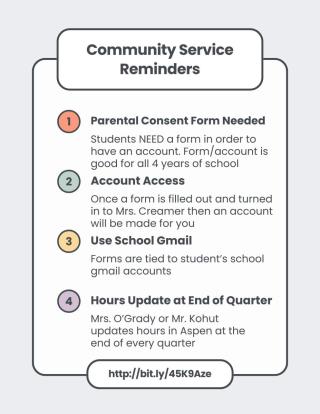
This information will also be available to students and parents in the "My Info" section on Aspen. This information will be updated at the end of each quarter, allowing students to view the number of hours they have submitted and their community service status.
BHS has partnered with MobileServe, a Community Service App, to streamline the collection and verification of community service hours. For students to use the app, parents must complete the Parental Consent Form. Please note this form only needs to be completed one time and is valid for the duration of the student’s time at Bedford High School.
| Community Service IS... | Examples |
|---|---|
| any activity that you are not paid for | volunteering at the VA hospital, animal shelters/hospitals, local nursing home, local library, and/or local charities and fundraisers |
| is not for a relative | joining a committee that organizes and runs a Relay for Life event |
| results in a service to at least one person and benefits the community | assisting elderly neighbors with yard work/snow shoveling |
| is separate from an activity that you already receive credit for | coaching youth sports (for free) |
| and/or takes place during Flex Block or outside the school day | flex block activities such as recycle collecting, art department organizing, etc. |
Please note that you cannot create a MobileServe account without submitting the completed Parental Consent Form first. If you have already submitted a form in a previous school year, you do not need to fill out another one. If you log hours in MobileServe without completing the Parental Consent Form, then your hours will not be logged under BHS and, therefore, will not be uploaded to Aspen. It will be the student's responsibility to contact MobileServe to update the category of the service logs to "BHS" once they have submitted their consent forms.
Once the consent form is signed, please return it to Mrs. O'Grady's or Mr. Kohut's mailbox in the BHS Main Office. After your form is processed, students will receive an email at their school address with login details. Mrs. O'Grady or Mr. Kohut will create accounts for all students, so please do not create one independently.
Once your account is set up, students can download the MobileServe app from the Self Service on their school iPad. Through the app, students can log their service hours using various methods, such as signatures, geotags, or photos. The app will then automatically notify the supervisor for verification. If you see the hours in "pending" but not in "approved" that means that your supervisor has not approved your hours. It is the student's responsibility to follow up with the supervisor to make sure the supervisor approves the hours. Once the hours are approved, then Mrs. O'Grady or Mr. Kohut can verify them and they will be put into Aspen at the end of the quarter.
The app also tracks students' cumulative hours, allowing them to monitor their progress toward the goal of 20 hours. Additionally, events and community service opportunities will be posted within the app.
If you have any questions or concerns, please contact Mrs. O'Grady or Mr. Kohut
| Attachment | Size |
|---|---|
 parental_consent_form_7.24.25.docx.pdf parental_consent_form_7.24.25.docx.pdf | 101.76 KB |